Choose Global or World Settings
What a global setting and a world setting each are, who changes them, where their values live, and how to pick the right kind for a setting you are about to declare.
Every setting you declare is one of two kinds, and you choose which before you choose the control. Use this page to pick the kind, then Choose a Setting Type for the control.
A global setting is a mod setting that belongs to the player. A world setting is a mod setting that belongs to one world. The kind decides who changes the value, where it is stored, when it can change, and whether everyone in a multiplayer game gets the same one.
Pick in one question
Does every player in the world have to agree on this value?
- Yes — make it a world setting. The host picks it, the save stores it, and every client receives it.
- No — make it a global setting. Each player picks their own, and it follows them into every world.
The rest of this page is what to do when that question is not enough.
| Global setting | World setting | |
|---|---|---|
| Belongs to | the player | one world |
| Who changes it | each player | the host |
| Where they change it | the Mods menu, from the main menu or in game | Mods World Settings, on the Mods tab of the New Game and Continue Game screens |
| When it can change | any time | only while no world is running |
| Applies to | every world that player loads | everyone in that world |
| Stored in | <user data folder>\Gears\ModSettings.xml, shared by every mod | <save folder>\WorldModSettings.xml, one file per world |
| Setting path | TabName.CategoryName.SettingName | CategoryName.SettingName |
modsetting() group | Global | World |
What a global setting is
A global setting is the player's own preference. They open the Mods menu, pick your mod, edit the rows on its Settings tab and press Apply. Gears saves the value to one file in the player's user data folder and restores it the next time the game starts, so the setting applies in every world that player loads and survives a change of world or server.
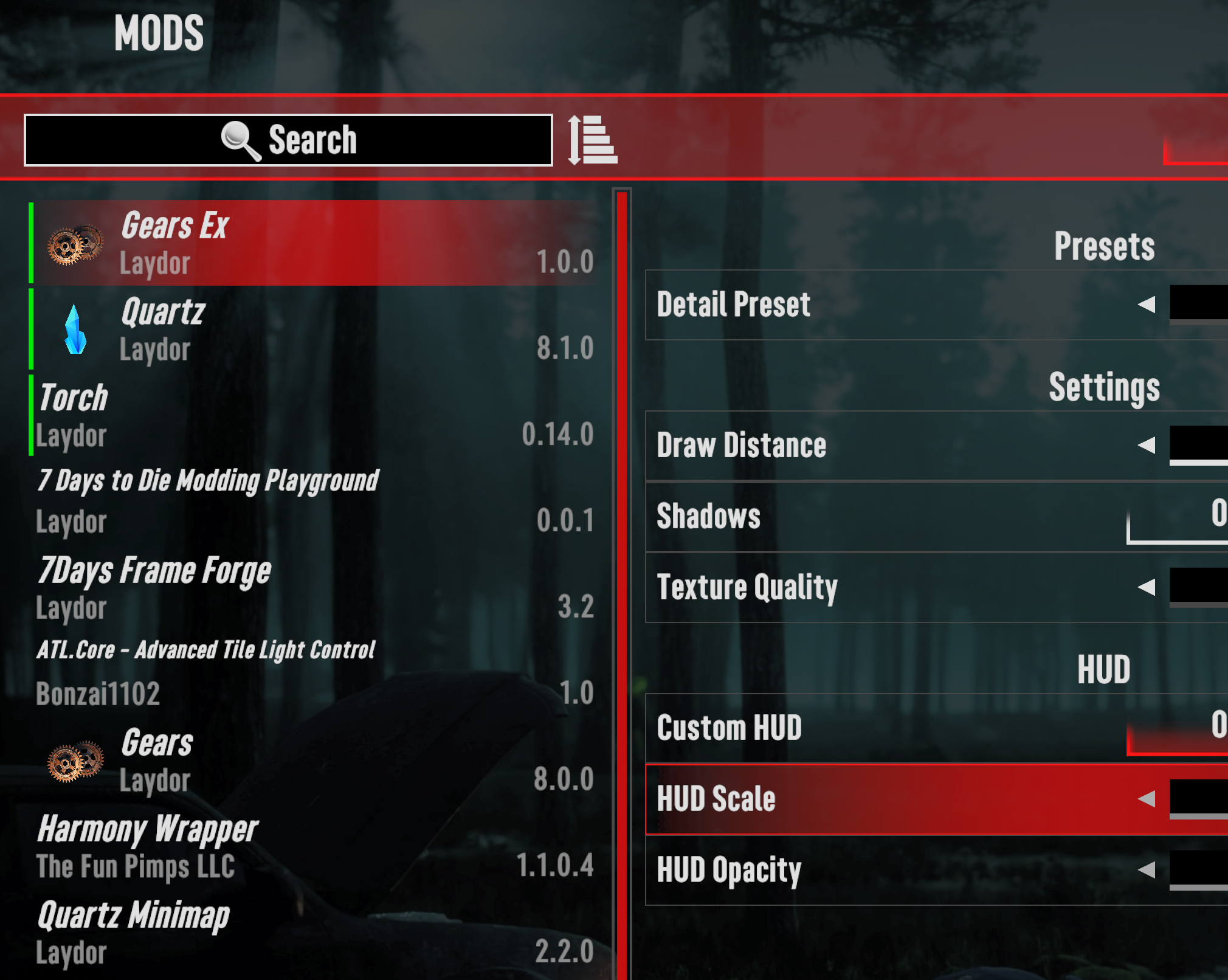
Global settings are the only kind that can be changed while a world is running, and the only kind that offers every control:
- A Color row opens the game's color picker.
- A Binding row rebinds one of your mod's controls.
- A
RestartScopeofReloadorRestartwarns the player that a change needs a world reload or a game restart. Gears only shows the warning; applying the value is still your code's job.
Global settings are also the only kind with tabs, so a mod with many of them can group them across a row of tabs rather than one long list.
In multiplayer, a global setting is per player and nothing sends it anywhere. Two players in the same world can hold different values, and a client's value is never overwritten by the server.
What a world setting is
A world setting belongs to one save. The host picks it before the world starts: on the New Game or Continue Game screen, they open the Mods tab, after the Multiplayer tab, and press Mods World Settings.
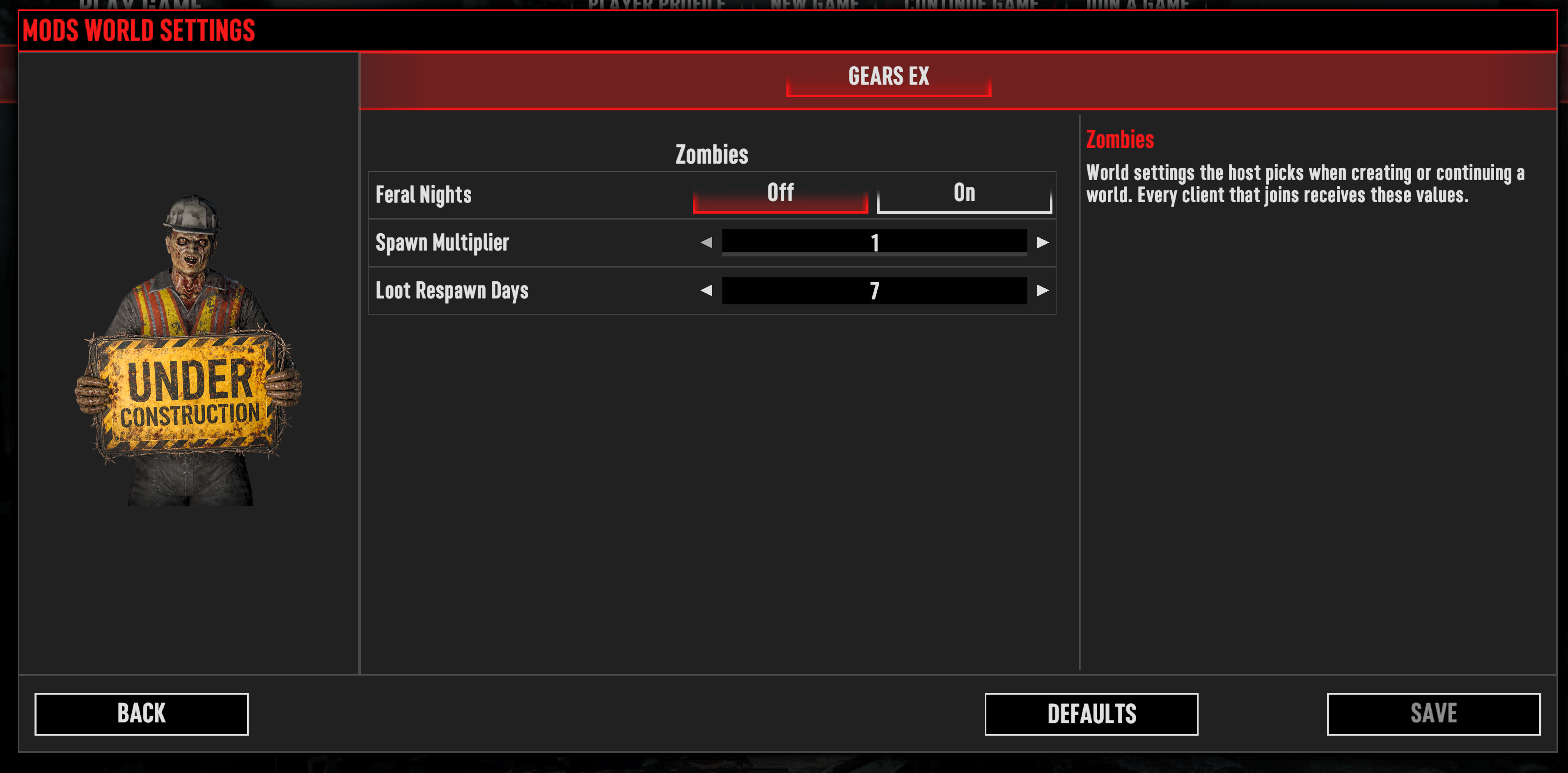
Gears writes the chosen values into the save folder as WorldModSettings.xml and sends them to every
client that joins, so everyone in that world plays with the same values.
A new world starts with every world setting at its defaultValue, unless the host changed values
on the New Game screen's Mods World Settings. Then it starts with the values last used there.
Gears keeps those values separately, in newGameWorldModSettings.xml beside the saves.
A world setting cannot be changed while the world is running. The host has to leave the world to reach the screen again, which is what makes a world setting the right place for a rule the rest of your mod can rely on not moving mid-session.
Use a world setting for anything that decides how the world itself behaves: spawn rates, loot amounts, day length, whether a feature of your mod is on for that playthrough.
A client without a Gears server gets defaults
When a player joins a server that does not have Gears, no world values arrive. Gears resets every
world setting to its defaultValue and then tells your mod. Choose defaults that are safe to play
with, because some sessions will use nothing else.
Choose between them
Work down this list. The first answer that fits decides the kind.
- Would two players disagreeing about it break the game they share? Spawn counts, loot multipliers, recipe costs and anything else the server simulates have to be a world setting.
- Is it about what one player sees or hears? Heads-up display (HUD) scale, colors, units, hint text and audio are personal. Make them global.
- Does the player need to change it while playing? Only a global setting can change during a session. A world setting is fixed until the host stops the world.
- Is it a color or a key binding? Those exist only as global settings. Gears drops a
ColororBindingdeclared under<World>, and writes nothing to the log about it. - Does it change the meaning of a value already saved into the world? Prefer a world setting, so the value travels with the save that depends on it.
Worked examples:
| Setting | Kind | Why |
|---|---|---|
| HUD scale | global | one player's screen, and they may want it changed mid-game |
| Accent color for your HUD | global | Color is global only |
| "Open my mod's window" key | global | Binding is global only |
| Show hint popups | global | a personal preference with no effect on anyone else |
| Zombie spawn multiplier | world | the server simulates spawns for everyone |
| Loot respawn days | world | every player has to be playing the same rules |
| Feral nights on or off | world | it changes the world for the whole session |
| Difficulty preset for your mod's feature | world | a playthrough decision, not a per-player one |
A mod can declare both, and most do. One feature often needs a world setting for the rule and a global setting for how each player sees it: the world decides that a danger meter exists, the player decides where it sits on their screen.
What each kind supports
| Global | World | |
|---|---|---|
| Tabs | yes | no, categories sit directly on the mod |
| Selector, Slider, Switch | yes | yes |
| Color, Binding | yes | no |
RestartScope | yes | no, a world value is applied with the world |
OnSelectedChanged | yes | yes, while the host is picking values |
OnValueChanged | yes | no such event; see below |
OnSettingApplied | yes | no, there is no per-player Apply step |
Enabled, and the gate it applies | yes | yes |
A world setting raises no OnValueChanged because its applied value arrives with the world rather
than changing under the player. A method tagged [SettingOnValueChanged] on a world path still
binds, as an invoke-only listener that only SyncSettingsToClass calls. Write it with
includeInSync: true, or it never runs. See
[SettingOnValueChanged] on a world path.
Declare each kind
Both kinds live in the same ModSettings.xml, under <Global> and <World>. Global settings need a
<Tab> around their categories; world settings do not:
<?xml version="1.0" encoding="utf-8"?>
<ModSettings version="2">
	<Global>
		<Tab name="General" displayKey="myModTabGeneral">
			<Category name="Display" displayKey="myModCatDisplay">
				<Slider name="HudScale" displayKey="myModHudScale" type="float" defaultValue="100%">
					<Incremental increment="5%" minValue="50%" maxValue="150%" />
				</Slider>

				<Switch name="ShowHints" displayKey="myModShowHints" type="bool" defaultValue="true" />
			</Category>
		</Tab>
	</Global>

	<World>
		<Category name="Zombies" displayKey="myModCatZombies">
			<Slider name="SpawnMultiplier" displayKey="myModSpawnMultiplier" type="int" defaultValue="1">
				<Incremental increment="1" minValue="1" maxValue="4" />
			</Slider>
		</Category>
	</World>
</ModSettings>
Every displayKey above is a localization key your mod supplies. See
Localize Your Settings.
That difference in shape is why the two kinds have different path lengths everywhere else: three
parts for a global setting, two for a world setting, in modsetting() calls and in the binding
attributes alike.
<!-- Three parts for global, two for world. -->
<if cond="modsetting('MyMod', 'Global', 'General.Display.ShowHints') == 'True'">
<if cond="modsetting('MyMod', 'World', 'Zombies.SpawnMultiplier') == '4'">
A world setting's name must be unique across every world category of your mod. Gears looks up
saved world values by setting name alone. If two categories each declare a Speed setting, the
first category's Speed receives the saved value of whichever one is written last, and the other
Speed is never restored and stays at its default. Global settings are keyed by tab, category and
name, so they do not have this constraint.
Read each kind in C#
Each kind has its own callback, and each fires when that kind's values are final:
| Kind | Callback | Fires |
|---|---|---|
| Global | OnGlobalSettingsLoaded(IModGlobalSettings) | once at startup, after the player's saved values are restored |
| World | OnWorldSettingsLoaded(IModWorldSettings) | every time a world's values arrive, so once per world load, rejoin or server change |
OnWorldSettingsLoaded firing more than once per session is the practical difference to write code
for. Treat it as "this world's values have changed" rather than as a startup callback, and read the
values or call SyncSettingsToClass every time it runs.
Gears does not call OnWorldSettingsLoaded at all for a mod with no world settings.
World settings are skipped in the prefab editor
Gears does no world settings work for the worlds named Empty and Playtesting, which are the
ones the prefab editor opens. It writes no WorldModSettings.xml and never calls
OnWorldSettingsLoaded. Test world settings in a real world.
Where to go next
- Getting Started — declare both kinds in one
ModSettings.xmland see them in the game. - Choose a Setting Type — the five controls, now that you know the kind.
- Use Global Settings in C# — tabs, categories and the three values every setting holds.
- Use World Settings in C# — what changes on the world side, and when its values are trustworthy.