Make One Setting Depend on Another
Use Enabled to gray out the settings another setting has taken over, and avoid the trap that stops a grayed setting ever being saved.
When one setting decides whether others matter, gray the others out. Set Enabled to false on a
Selector, Slider or Switch and Gears dims its control and stops the player changing it.
This guide covers what Enabled does, the one behavior that surprises people, and why Gears has no
way to hide a setting outright. It needs C#; ModSettings.xml has no conditional element.
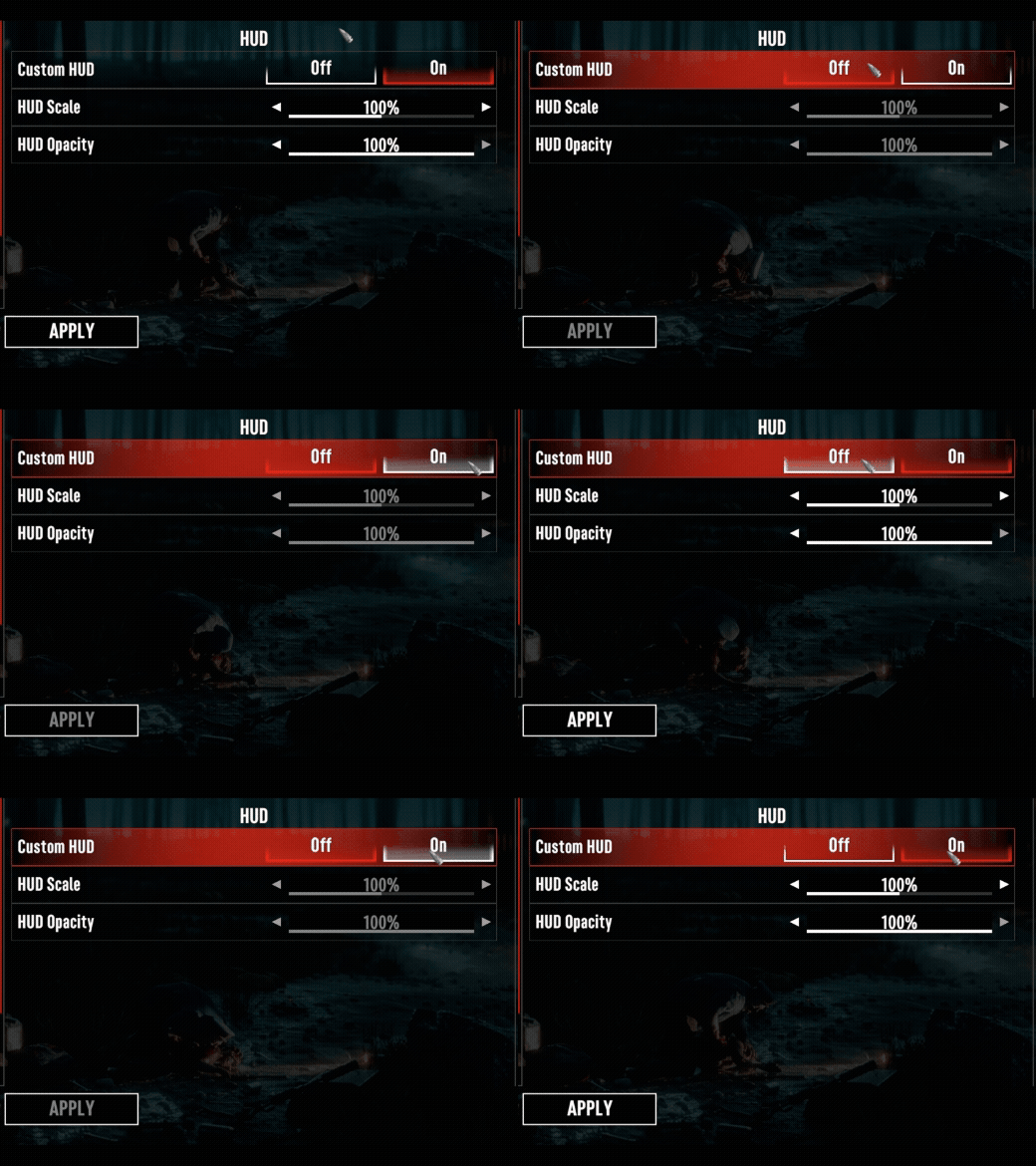
Gray a row out
Enabled lives on IModSetting, so every setting has it,
categories included, but only some setting types act on it. It starts true.
hudScale.Enabled = false;What the player sees depends on the setting type:
| Type | While Enabled is false |
|---|---|
| Selector, Slider, Switch | The control is dimmed and does not respond. The name label stays as it was. |
| Color | Nothing changes on screen. The player can still pick a color, but Apply does not apply it. |
| Binding | Nothing changes. The player can still rebind or clear the key, and Apply keeps it. |
| Category | Nothing changes, and the settings in the category stay enabled. Enabled does not cascade. |
So use Enabled on Selectors, Sliders and Switches. To gray out a whole category, set it on each
setting in the category.
Unlike a value change, this needs no RefreshUI() call. Assigning Enabled raises OnEnabled, and
the row redraws itself from that. See
Change a setting from code for the rule
that applies to everything else.
OnEnabled fires only when the value actually changes, so assigning false twice raises it once.
A grayed setting never applies
Disable after applying, not before
While a value setting (Selector, Slider, Switch or Color) has Enabled set to false,
ApplyCurrentChange() does nothing at all. The applied value does not move, and neither
OnValueChanged nor OnSettingApplied fires. Assigning SelectedValue still changes the value
but raises no OnSelectedChanged. So a row you gray out keeps the applied value it already had,
however the selected value moves afterwards.
This catches people who gray a row out and expect its current value to be saved along with the rest. It is not. If the value on a row matters, either apply it before disabling the row, or leave the row enabled and ignore its value in your own code.
The gate is the same on a global setting and on a world setting. Two cases sit outside it:
- A Binding is not gated.
ApplyCurrentChange()on a disabled Binding still applies the key and raisesOnSettingApplied. - Code can still move the applied value. Assigning
SettingValueon a disabled setting changes the applied value, and Gears saves it with the rest. It raises noOnValueChanged, so your own listeners do not hear about it.
Edit, then disable
The gate also catches an edit the player made before the row grayed out. Say the player moves HudScale, then turns the custom HUD off before pressing Apply. Apply skips the disabled slider, so the new scale is not applied, and it is not discarded either. The slider keeps showing the unapplied value, and Apply will not commit it until the player changes that row again.
If that matters to your mod, call DiscardCurrentChange() on a setting just before you set its
Enabled to false. The row goes back to its applied value, and the redraw that Enabled triggers
shows it.
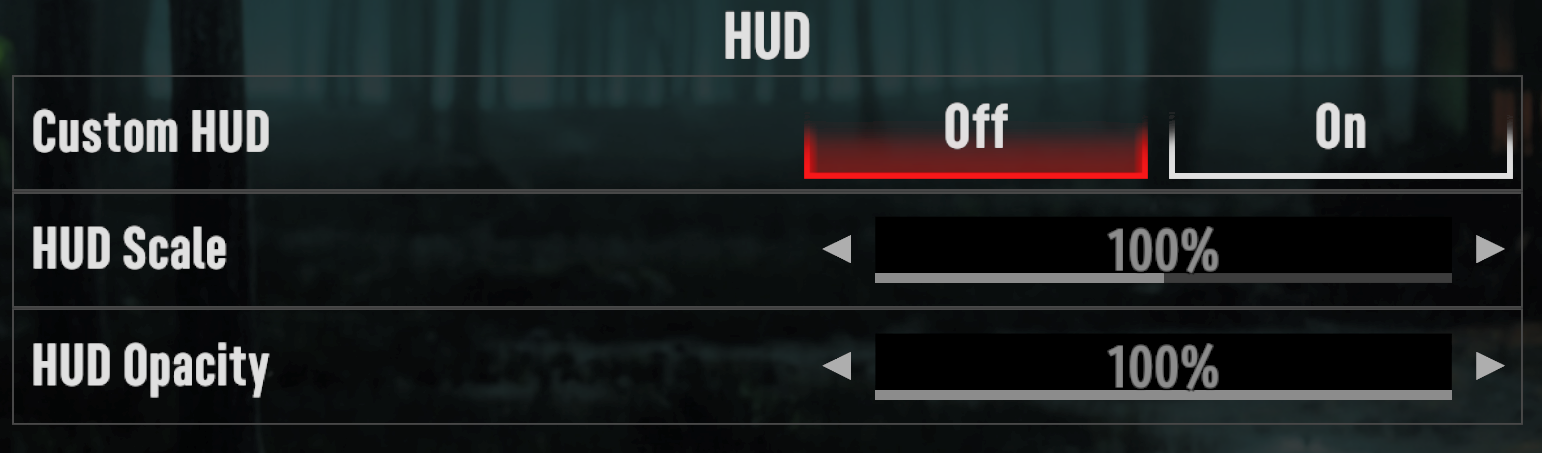
Drive it from another setting
Listen to the controlling setting and set Enabled on the ones it governs. Use
[SettingOnSelectedChanged] so the gray follows the menu while the player is still deciding, rather
than waiting for Apply.
The example drives two sliders from one switch, declared in the General tab's Hud category:
<?xml version="1.0" encoding="utf-8"?>
<ModSettings version="2">
	<Global>
		<Tab name="General" displayKey="myModTabGeneral">
			<Category name="Hud" displayKey="myModCatHud">
				<Switch name="UseCustomHud" displayKey="myModUseCustomHud" type="bool" defaultValue="true" />

				<Slider name="HudScale" displayKey="myModHudScale" type="float" defaultValue="100%">
					<Incremental increment="5%" minValue="50%" maxValue="150%" />
					<Formatter ui="0%" />
				</Slider>

				<Slider name="HudOpacity" displayKey="myModHudOpacity" type="float" defaultValue="100%">
					<Incremental increment="5%" minValue="0%" maxValue="100%" />
					<Formatter ui="0%" />
				</Slider>
			</Category>
		</Tab>
	</Global>
</ModSettings>
The class below binds those three settings and grays the sliders out while the switch is off:
public static class HudSettings
{
    private const string UseCustomHudPath = "General.Hud.UseCustomHud";
    private const string HudScalePath = "General.Hud.HudScale";
    private const string HudOpacityPath = "General.Hud.HudOpacity";

    [Setting(UseCustomHudPath)]
    private static ISwitchGlobalSetting<bool> useCustomHud;

    [Setting(HudScalePath)]
    private static ISliderGlobalSetting<float> hudScale;

    [Setting(HudOpacityPath)]
    private static ISliderGlobalSetting<float> hudOpacity;

    // includeInSync: true opts this in to SyncSettingsToClass, so the sliders start out
    // gray if the custom HUD is saved off.
    [SettingOnSelectedChanged(UseCustomHudPath, true)]
    private static void UseCustomHudSelected(IValueModSetting<bool> setting, bool newValue)
    {
        // The two sliders only mean anything while the custom HUD is on.
        hudScale.Enabled = newValue;
        hudOpacity.Enabled = newValue;
    }
}
Binding subscribes the handler but never calls it, so pair it with
SyncSettingsToClass
to set the starting state. Gears assigns the tagged fields before it subscribes the listeners, so by
then the handler can safely reach hudScale and hudOpacity:
public void InitMod(IGearsMod mod)
{
    mod.GlobalSettings.BindSettingsClass(typeof(HudSettings));
}

public void OnGlobalSettingsLoaded(IModGlobalSettings modSettings)
{
    modSettings.SyncSettingsToClass(typeof(HudSettings));
}
Without the sync call the handler would not run until the player first touched the switch, leaving
the sliders enabled through a session where the custom HUD was off the whole time. The
includeInSync: true on the attribute is what opts the handler into it — a listener without the flag
is skipped.
You cannot hide a setting
Gears has no visibility flag. A setting is either in its category and drawn, or not in the category at all.
Removing it with IGlobalModSettingsCategory.RemoveSetting does take the row away, but it is a poor
substitute for hiding:
- The settings window does not lay itself out again on its own, so the row stays on an open page until the player switches tabs, presses Apply or reopens the window.
- The setting is gone from the tree, so
GetSettingreturns null and any listener bound to it is bound to an object nothing else references. - Gears saves the values of the settings that exist. A removed setting is not among them.
Use Enabled. A grayed row tells the player the option exists and why it is unavailable, which a
missing row cannot.
Where to go next
- Add a Preset Selector — one row that moves several others. It is the other half of this pattern, and the reason its driven rows are left enabled.
- Bind Settings with Attributes — the attributes and paths used
above, including
[SettingOnEnabled]for reacting to the gray rather than causing it.
Add a Preset Selector
Build a Selector that moves several other settings at once, and falls back to Custom when the player edits one of them by hand.
ModSettings.xml Reference
The complete V2 schema for ModSettings.xml as the parser reads it — every element, every attribute, and what happens when something is wrong.